Coming soon: Collapsible Side Navigation on an Upgraded User Interface – Designed for Faster Daily Workflows
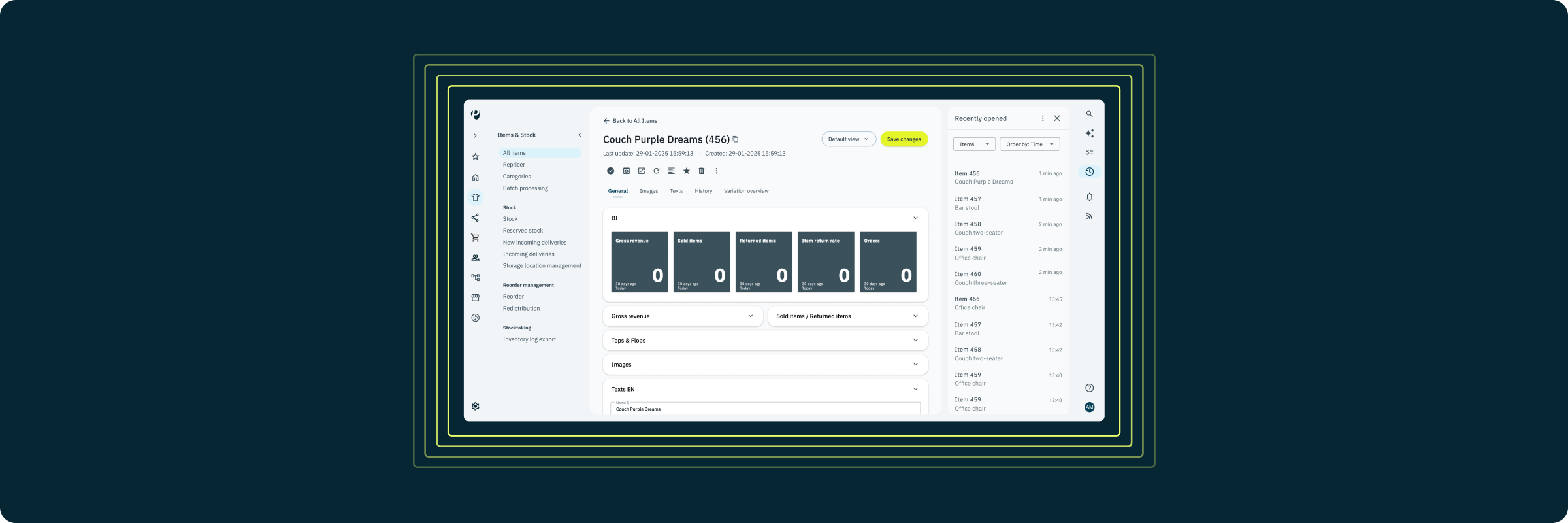
Soon, we're releasing changes to the user interface and navigation, rebuilt around how you actually work. Once it becomes available to you, you'll be notified directly inside your system. Here is an overview of the upcoming changes.
PlentyONE has grown fast, and so has what you run through it. Over time, the structure has asked more of you: adding extra clicks to reach the tools you use daily, crowding menus as we added capability, and building a steeper learning curve.
We ran usability testing with many of you to find exactly where that friction lives in your daily operations. The result is a navigation and user interface that makes the same powerful platform simpler to use every day.
A navigation built around your workflow
This release changes how you navigate PlentyONE – here's how:
- Left-hand sidebar navigation: Main menus move from the top to a collapsible left sidebar, for fewer clicks between the tasks you do most.
- Right-hand utility toolbar: Quick access to AI tools, admin settings, and your recently viewed datasets in one dedicated panel.
- Reorganized menu entries: Related features are now grouped together and key pages renamed so settings and daily tools live where you intuitively expect them.
- Custom favorites: Pin your most-used pages directly to the left sidebar for single-click access.
| ℹ️ |
This update rolls out to all systems between 07 and 21 October. You'll be notified, once it's available to you. Newly created systems start on the new user interface by default.
On existing systems, you'll find a toggle under the Themes menu to switch between old and new navigation — a transitional option while you adjust. The old navigation stays available via the Themes toggle for now; we'll share a transition timeline in a future update. Our documentation updates alongside this rollout, so it always matches what's on your screen. |
Here's how to get started upon release
On your first login after the update, here’s how to get up to speed.
- Take the guided tour: It launches automatically on your first login after the update, walking you through exactly what changed and where your daily tools now live.
- Find your most-used interfaces: Locate the pages you open constantly, now fewer clicks away.
- Set your favourites: Hover over the page name and use the star symbol to pin the tools you use most, right in the left-hand sidebar, for one-step access going forward.
If anything feels unfamiliar at first, our support team at the Service Desk is ready to help.